

How to Choose a Google Ads and Meta Ads Agency for a B2B or Professional Services Business in the UK
Most B2B firms that hire a paid ads agency get a monthly report full of clicks and a sales team that says the leads are poor. You can avoid that before you sign. This guide shows what a good Google Ads and Meta ads agency does, who must own what, the red flags, the questions to ask and a checklist you can copy.
Quick answer
To choose a Google Ads or Meta ads agency for a B2B or professional services firm, check five things. First, you own the ad accounts, the Meta pixel or dataset and all the data, and the agency only has access. Second, the agency sets up tracking before it spends, including sending qualified leads and won deals back to Google and Meta. Third, it works on your offer and your landing page as well as the ads. Fourth, it reports on cost per qualified lead and pipeline, with clicks and cost per lead as supporting numbers. Fifth, the contract is short and plain, the fee model is clear and nobody promises a number of leads. Badges show activity and certification, so test the people and the process too.
For the general version with 25 questions for any agency, read how to choose a marketing agency. This guide covers paid ads only.
What does a good paid ads agency actually do?
In our experience, the ads themselves are the last step. A good agency does the work in this order.
1. Tracking first. Before a pound is spent, the agency checks that every form, call and booking is recorded as a conversion. It then plans how to tell Google and Meta which of those leads turned out to be real.
2. Offer and landing page. A buyer clicks, reads one page and decides. A good agency checks the page, the form and the offer, and tells you plainly what to change. See our paid ads playbook for B2B services.
3. Conversion import of qualified leads and sales. In our experience, this is the step most often skipped. On Google, offline conversion import lets you measure what happens after the click, such as a sale made by phone or in a meeting. Google gives every click an ID called a GCLID. You save it with the lead, then send it back with the result. Google now recommends starting with enhanced conversions for leads. It uses hashed lead details, such as a hashed email address, to match the lead in your CRM back to the ad click. On Meta, the Conversions API connects data from your server, website, app or CRM to Meta, and it covers offline conversions too.
4. Creative. A good agency tests several angles, uses your real expertise and keeps every claim true.
5. Testing. One change at a time, with a written reason and a date to review it.
6. Reporting on what matters. Cost per qualified lead, meetings booked, pipeline value and, where you can track it, revenue. Our article on vanity metrics vs revenue metrics explains why clicks alone mislead.
Why does step 3 matter? If you only tell the platforms “a form was filled in”, they find more people who fill in forms, including students and job seekers. Send back which leads became meetings and sales, and they get a better signal.
Who should own the ad accounts, pixel and data?
You should. It is the most important check, and the easiest to verify.
Google Ads. Google has five access levels: Email only, Billing, Read only, Standard and Admin. Only Admin can manage other users’ access, link Google Analytics to import conversions and accept, reject or unlink manager account requests. Agencies work through a manager account: it sends a link request and an admin on your account accepts it. So create the account under your business, keep Admin in-house and link the agency’s manager account.
Google also suggests adding at least one more administrator, so you are not stuck if one person leaves. And only one manager account can hold “account ownership”. If that is the agency’s, its admins can edit user access, managers and product links in your account. Ask who holds it.
Meta. Meta groups your Pages, ad accounts and data under a business portfolio. If your firm has full control of its portfolio, you can share assets such as Pages and ad accounts with a partner, like an agency. You can give full control or partial access for set tasks, such as managing ads. Even a partner with full control cannot share the asset with another business: Meta says only the owner can. So keep the ad account in your portfolio and add the agency as a partner.
The same goes for your pixel and dataset. Create it in your own business portfolio, then give the agency partner access. If the agency builds it in its own portfolio, your tracking history leaves with them.
Everything else. Google Analytics, Google Tag Manager, your CRM, your landing page builder and every creative file should be in your name, with the agency invited in.
How should you pay a paid ads agency?
There are three common models. Figures vary too much to quote, so here is how each one shapes behaviour.
Percentage of ad spend. Simple, and it scales with the work. The risk: the agency earns more when you spend more, even if the extra spend brings poor leads.
Fixed monthly fee. You know the cost in advance. Get the scope in writing: campaigns, creative, landing page work and meetings.
Hybrid or performance element. A fixed base plus a bonus tied to an outcome. It only works if the outcome is tracked in a system you both trust, such as your CRM.
Whatever the model, pay Google and Meta directly from your own payment method, so the fee and the media cost stay separate.
What are the red flags?
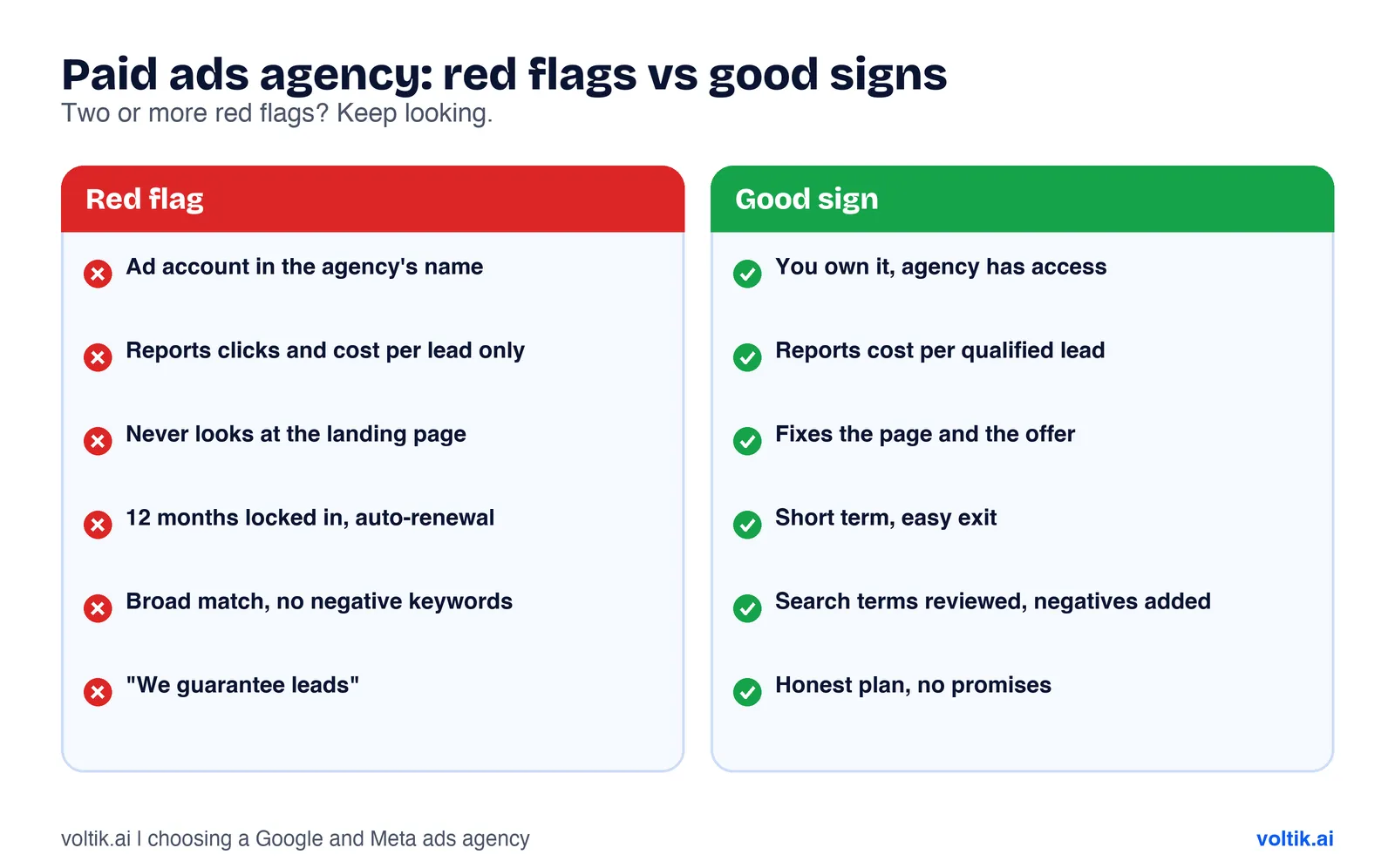 If you spot two or more red flags, keep looking.
The agency owns your account. If the Google Ads account, Meta ad account or pixel sits in the agency’s name, you can lose years of data when you leave.
The report shows clicks and cost per lead only. Cost per lead can look fine while many leads are spam. Ask for cost per qualified lead.
Nobody looks at the landing page. An agency that says the page is “your web team’s job” is managing half the problem.
Long lock-in. A minimum term can be fair while tracking and testing settle in. Twelve months with auto-renewal and a long notice window rarely is.
Broad match with no negative keywords. Google calls broad match its default match type. It reaches related searches beyond exact and phrase match, and Google says it is “critical” to pair it with Smart Bidding. In our experience, Smart Bidding is only as good as the conversion data you give it. Negative keywords stop your ads showing for searches you exclude. We have seen broad match with weak conversion data and an empty negative list lead to B2B budgets paying for job hunters and students.
“We guarantee leads.” At the time of writing (November 2026), the UK’s CAP Code says marketing must not materially mislead, and that marketers must hold proof for objective claims before they publish them. We are not lawyers and this is not legal advice. Rules and guidance change, so check the ASA’s current guidance or speak to a solicitor before you act. No agency controls the auction or your sales calls, so a guarantee with no proof behind it is a warning sign.
What questions should you ask, and what are good and bad answers?
These are specific to paid ads. They add to the general questions in our marketing agency guide.
1. “Whose name will the Google Ads account, Meta ad account and pixel be in?”
- Good: “Yours. We link our manager account and you add us as a partner in Meta.”
- Bad: “We run everything in our own account, it is easier.”
2. “How will you tell Google and Meta which leads were good?”
- Good: They name offline conversion import or enhanced conversions for leads on Google, and the Conversions API on Meta. They explain what data comes from your CRM and how often.
- Bad: “The pixel tracks form fills, that is enough.”
3. “What will you report each month?”
- Good: Cost per qualified lead, meetings booked, pipeline and what changed. Clicks and click-through rate sit lower down as context.
- Bad: A dashboard of impressions, clicks and cost per lead.
4. “What will you change on our landing page and offer?”
- Good: Specific notes after looking at the page, with a plan to test.
- Bad: “We just do the ads.”
5. “How do you handle match types and search terms?”
- Good: They review the search terms report on a set schedule, add negatives and explain when broad match makes sense.
- Bad: A vague answer, or “Google’s automation handles that.”
6. “Should we use Meta lead forms or send people to our website?”
- Good: “It depends on your sales process. Here is how we would test both.” See our comparison of Meta lead ads vs website conversion campaigns.
- Bad: A fixed answer with no reason.
7. “What happens when we leave?”
- Good: “You remove our access. Everything stays with you.”
- Bad: Talk of transfer fees or rebuilding the account.
8. “What would make you tell us to stop spending?”
- Good: A clear answer, such as broken tracking or an offer the market is not ready for.
- Bad: “We have never had to.”
For channel detail, our guides on Google Ads for B2B professional services and Meta ads for high-ticket B2B services go further.
Do the Google Partner and Meta Business Partner badges matter?
A little. Know what they measure first.
To become a Google Partner, a company must meet three sets of requirements. Its account must have an optimisation score of at least 70%. It must spend at least 10,000 US dollars over 90 days across the accounts it manages. And at least half of its account strategists must be certified in Google Ads. Premier Partners must also be in the top 3% of participating companies in their country. None of these checks look at whether past clients got qualified leads.
For Meta Business Partners, Meta says eligibility varies by solution type and is usually a mix of the quantity and quality of a company’s work across Meta technologies. Those who qualify get a badge.
Treat a badge as a sign of basic competence, then judge the answers to the questions above.
What should the first 90 days look like?
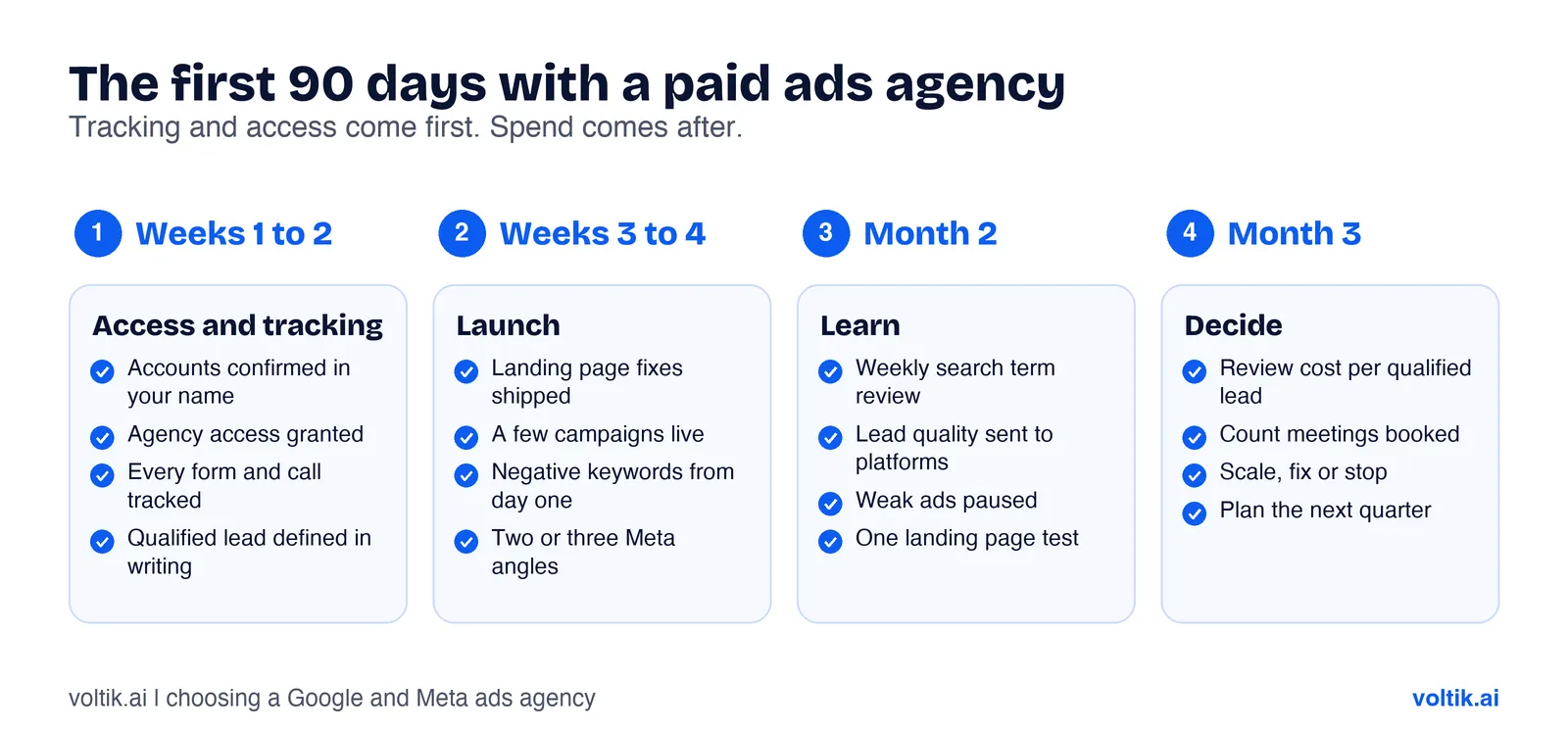 Tracking and access come first. Spend comes after.
This is the plan we would expect. Timings change with your budget and sales cycle.
Weeks 1 to 2: access and tracking. Accounts confirmed in your name. Agency access granted. Conversion tracking tested on every form, call and booking. A written definition of a qualified lead agreed with your sales team. CRM fields set up to mark leads as qualified, meeting booked and won.
Weeks 3 to 4: launch. Landing page fixes shipped. A small set of campaigns live, with negative keyword lists from day one on Google. Two or three creative angles on Meta.
Month 2: learn. Weekly search term reviews. First qualified lead data sent back to Google and Meta. Weak ads paused. One landing page test running.
Month 3: decide. A review of cost per qualified lead and meetings booked. A clear call on what to scale, what to fix and what to stop.
If nobody can tell you at day 90 how many qualified leads came from the ads, fix the set-up before you spend more.
The scoring checklist
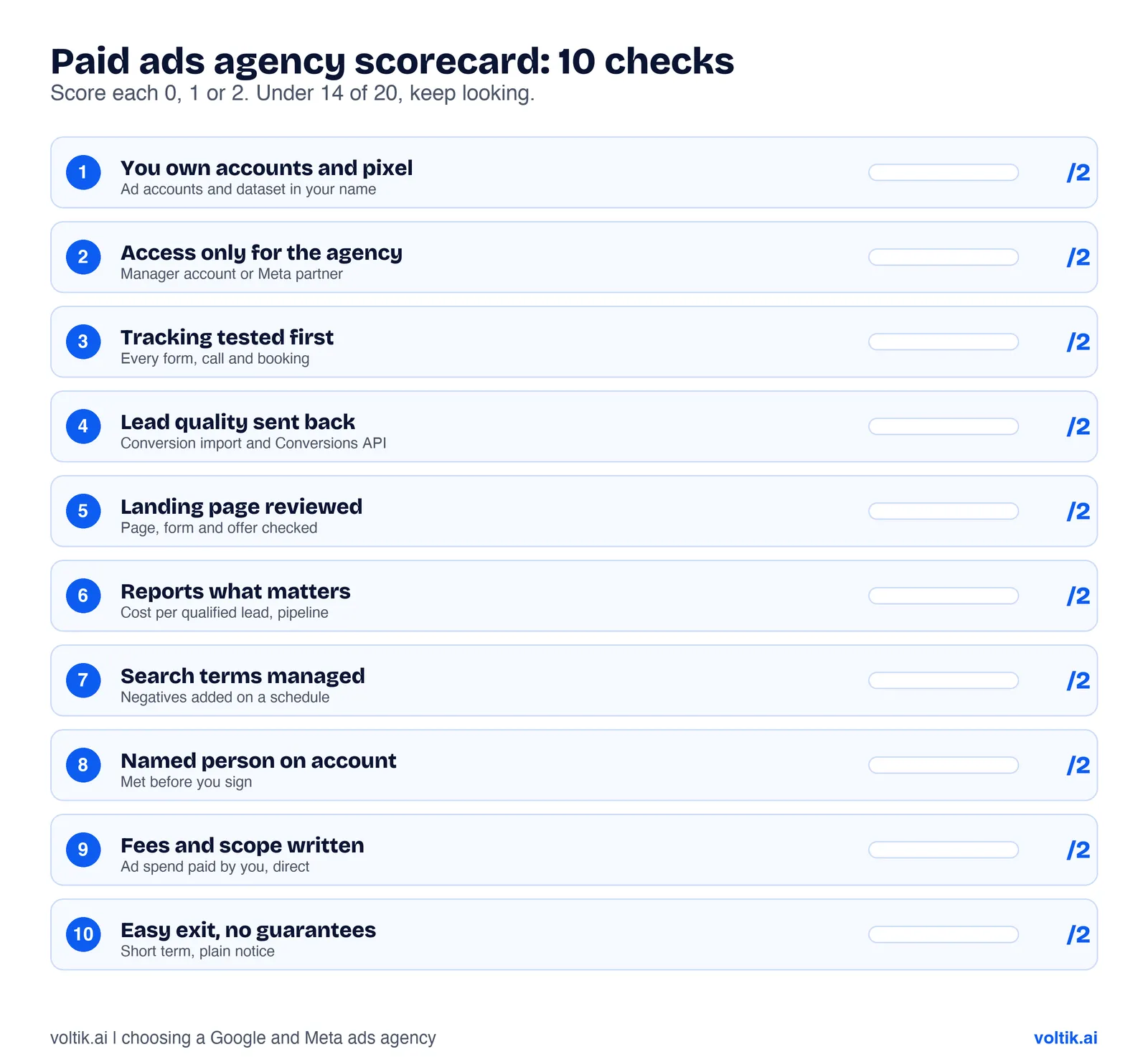 Score every agency on your shortlist the same way.
Copy this into a spreadsheet. Score each check 0 (no), 1 (partly) or 2 (yes). Under 14 out of 20, keep looking.
| # | Check | Score (0 to 2) |
|---|---|---|
| 1 | Ad accounts, pixel and dataset stay in our name | |
| 2 | Agency uses manager or partner access only | |
| 3 | Tracking is tested before launch | |
| 4 | Qualified leads and sales go back to Google and Meta | |
| 5 | Agency reviews our landing page and offer | |
| 6 | Reports lead with cost per qualified lead | |
| 7 | Negative keywords and search term reviews are planned | |
| 8 | Named person runs our account | |
| 9 | Fee model and scope are written down | |
| 10 | Short term, easy exit, no guaranteed leads |
Where Voltik fits, and when we are the wrong choice
We run Google and Meta ads for B2B and professional services firms in the UK, and we also build the website and tracking behind them. So the landing page, conversion set-up and CRM link sit with the same team as the ads.
We suit firms that sell a considered service, have a sales process that follows up leads, and want to judge ads on qualified leads and pipeline. We work best when someone on your side will mark leads as good or bad in the CRM, because that feedback is what makes the tracking useful.
We are the wrong choice if you want the lowest possible fee for ad management only, with no interest in tracking or the landing page. We are also the wrong fit if you need large-scale ecommerce shopping campaigns, or if you want a guaranteed number of leads. We will not promise that.
Score us on the checklist above like anyone else.
Questions people ask
How do I choose a PPC agency for a B2B business?
Check that you will own the accounts, that tracking comes first, that qualified leads are sent back to Google and Meta, and that reports focus on cost per qualified lead and pipeline. Then score each agency on the checklist above.
Should my agency own my Google Ads account?
No. Create the account under your business, keep Admin access in-house and link the agency’s manager account. On Meta, keep the ad account and pixel in your business portfolio and add the agency as a partner.
Is a Google Partner agency better?
It may be more experienced with Google’s tools. The badge requirements cover optimisation score, spend across managed accounts and staff certification. They do not measure leads or sales for clients like you.
What is offline conversion import and why does it matter?
It lets you tell Google which ad clicks became sales or qualified leads after the form was filled in. The platform can then aim for more leads like those. Meta’s Conversions API does a similar job and can send CRM and offline events.
Can a Meta ads agency work for B2B?
Yes, if the offer suits people scrolling a feed and the tracking sends lead quality back to Meta. Our guide to Meta ads for high-ticket B2B services covers when it fits.
Sources
- Google, “How to become a Google Partner or Premier Partner”, Google Ads Help, accessed November 2026.
- Google, “About access levels in your Google Ads account”, Google Ads Help, accessed November 2026.
- Google, “Manage access to your Google Ads account”, Google Ads Help, accessed November 2026.
- Google, “Manager accounts: Link accounts to your manager accounts”, Google Ads Help, accessed November 2026.
- Google, “New access level and account ownership for your Google Ads account”, Google Ads Help, accessed November 2026.
- Google, “About offline conversion imports”, Google Ads Help, accessed November 2026.
- Google, “About enhanced conversions for leads”, Google Ads Help, accessed November 2026.
- Google, “Your guide to broad match”, Google Ads Help, accessed November 2026.
- Google, “About negative keywords”, Google Ads Help, accessed November 2026.
- Meta, “Meta Business Partners: Trusted experts who enable businesses to grow”, Meta for Business, accessed November 2026.
- Meta, “Give a partner access to business assets in your business portfolio”, Meta Business Help Centre, accessed November 2026.
- Meta, “About Conversions API”, Meta Business Help Centre, accessed November 2026.
- Meta, “Best practices for Conversions API to help improve ad performance”, Meta Business Help Centre, accessed November 2026.
- Meta, “Conversions API”, Meta for Developers, accessed November 2026.
- Committee of Advertising Practice, “03 Misleading advertising”, UK Code of Non-broadcast Advertising (CAP Code), ASA website, accessed November 2026.
Want us to run your Google and Meta ads?
We set up the tracking, the landing page and the campaigns, all in your accounts, and report on qualified leads and pipeline. See our paid advertising service, or book a free call and we will score your current set-up against the checklist above.
Work with us