

How to Choose a Web Design Agency for a Professional Services Firm in the UK: Red Flags, Questions and a Scoring Checklist
Many firms pick a web design agency from its portfolio. That is how you end up with a beautiful site that gets no enquiries, loses its Google rankings at launch, or sits on a platform you cannot leave. This guide shows you what to check instead, with questions to ask and a scoring checklist you can copy.
It is written for UK law firms, consultancies, accountants, advisers and B2B firms.
Quick answer
To choose a web design agency for a professional services firm, look past the design. A good agency writes or shapes your copy, builds the site to turn visitors into enquiries, connects forms to a CRM with follow-up, sets up tracking you can trust, keeps the site fast, prepares it for Google and AI search, and moves your old pages with redirects so you keep your rankings. Your firm should own the domain, hosting, code and every account. Avoid agencies that resell templates as custom work, have no redirect plan, lock you into their platform, have no plan for content, or show only pretty screenshots. Ask how they handle each of these, score the answers, and pick the agency that scores highest. If you are a regulated firm, check they know your rules too.
What should a good agency deliver beyond the design?
Design is the part you can see. For a firm that sells expertise, it is rarely the part that wins work. Careful buyers read and compare before they get in touch. The site has to answer their questions and make the next step easy.
Copy. Words sell services. Ask who writes them. A good agency interviews your partners and turns what they know into plain pages. A weak one asks you to “send over the text” and pours it into boxes. Our website playbook for consultants and experts shows what those pages need to say.
Conversion. Every page should have one clear next step, such as booking a call or asking a question. Ask how they decide where calls to action go and how they test them.
Forms, CRM and follow-up. An enquiry that lands in a shared inbox and waits two days is a lost enquiry. A good agency connects your forms to a CRM, alerts the right person and sends a confirmation. Our website lead capture checklist covers the details.
Email that arrives. Form alerts and confirmations need to come from a properly set up domain, or they end up in spam. See our guide to separate email domains for notifications, follow-up and cold email.
Tracking. You should be able to see which pages and channels bring enquiries. That means analytics and conversion tracking set up on day one, with a cookie banner that follows UK rules. At the time of writing (November 2026), the ICO’s guidance says a narrow exception for statistics exists, that it does not apply to online advertising, and so ad tracking needs consent. We are not lawyers and this is not legal advice. Rules and guidance change, so check the current guidance from the ICO, the SRA or your own regulator, or speak to a solicitor before you act.
Speed. Google publishes Core Web Vitals targets: the main content loading within 2.5 seconds, a responsiveness score (INP) under 200 milliseconds, and a layout shift score below 0.1. Google recommends good scores. It does not promise they will lift you to the top. Ask the agency to show you these scores on sites they have built.
SEO and AI search readiness. Google says there are no extra requirements to appear in its AI Overviews or AI Mode, and that the usual SEO basics still apply. So ask about the basics: clean page structure, crawlable text, internal links and structured data. Our article on why a website looks good but does not rank explains the common gaps.
Accessibility. At the time of writing, GOV.UK states that all UK service providers have a legal duty under the Equality Act 2010 to make reasonable adjustments. The public sector standard is WCAG 2.2 AA, and we use it as our build standard too. Ask your agency what standard they build to and how they test it.
Who should own the domain, hosting, code and accounts?
You should. All of it. This is the simplest test of an agency and the one firms most often skip.
Before you sign, get it in writing that your firm will own:
- The domain name, registered in your firm’s name, in an account you control.
- The hosting account, or at least admin access to it, with billing you can see.
- Your content and data in a form you can take with you: pages, images, contacts and form entries. Some all-in-one platforms do not let the site itself move to another host, so ask what can and cannot be exported.
- Every account the site uses: analytics, Google Search Console, tag manager, ad accounts, CRM, form tools and email sending.
- The content: copy, photos and design files, with the right to reuse them.
An agency can manage these for you. It should never be the only one with the keys. In our experience, painful agency exits are almost always about access.
Common mistake: letting the agency “set it all up” in their own name to save time. Ask them to add your firm as the owner and themselves as a user.
What are the red flags when choosing a website agency?
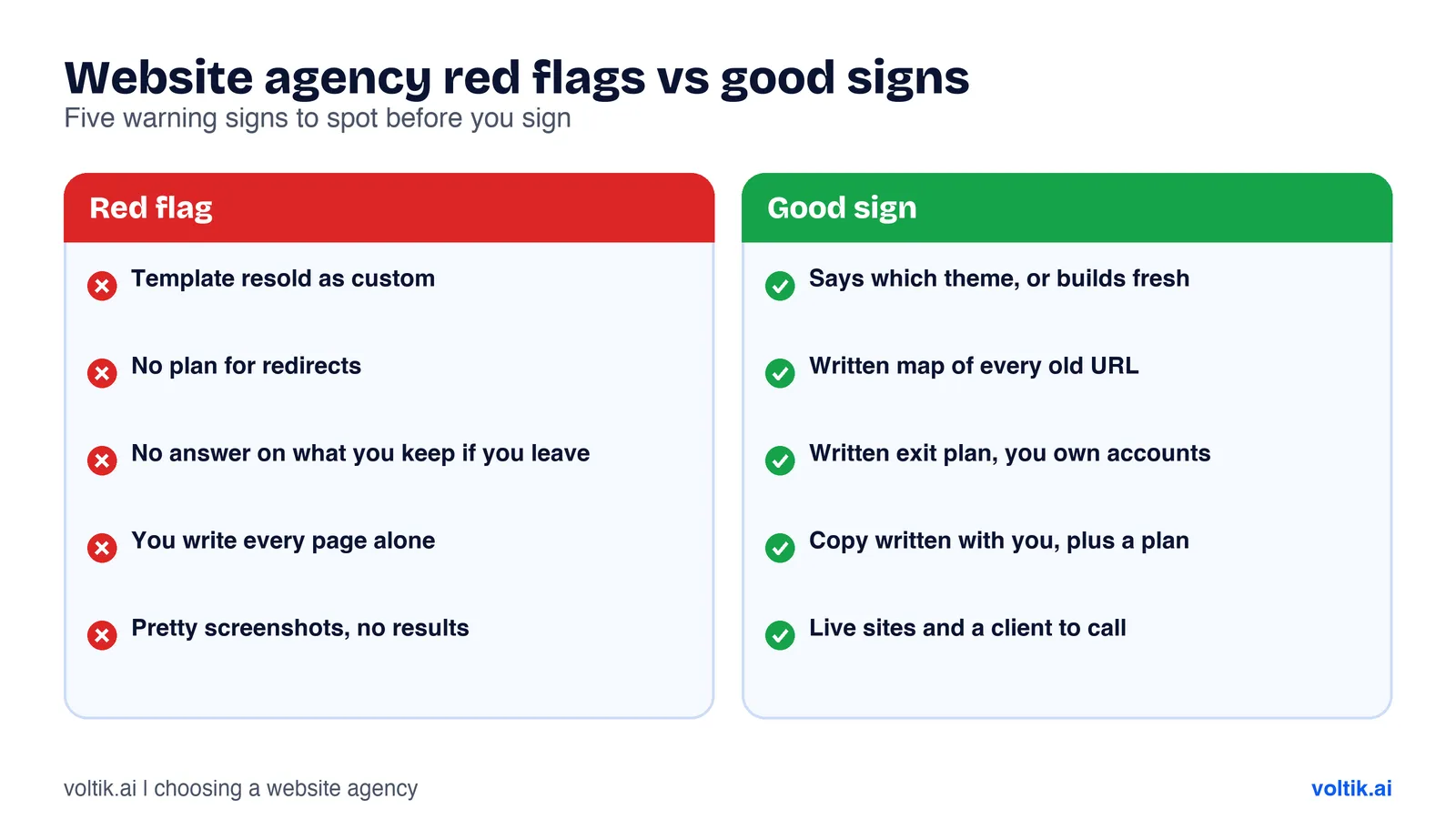 Five warning signs, and what good looks like next to each.
A template resold as custom. Templates are fine, and many good sites start from one. The red flag is paying for “bespoke” and getting a theme with your logo swapped in. Ask plainly: “Is this built from a template or theme? Which one?” An honest agency will tell you.
No redirect plan. Google’s guidance on site moves says to map each old URL to its new one and use permanent server-side redirects, such as a 301. It says to keep redirects for at least a year, and to expect rankings to fluctuate for a while during a move. If an agency cannot explain how it will do this, your rankings are at risk. Our website migration SEO checklist lists every step.
No exit plan. Some agencies build on a platform they run, such as an all-in-one system with the site, forms, CRM and follow-up in one place. That can be a good choice, because everything talks to everything else. The red flag is an agency that cannot tell you what happens if you leave. Ask: “If we leave in two years, what do we take with us, and in what form?” Get the answer in writing.
No content plan. If the agency expects you to write every page and has no plan for blog posts, case studies or service pages after launch, the site will look complete and stay empty.
A design-only portfolio. Screenshots show taste. They do not show whether those sites bring in work. Ask what happened after launch.
Which questions should you ask, and what do good answers sound like?
Our guide on how to choose a marketing agency has 25 general questions about teams, plans and money. The ones below are specific to websites.
“Who writes the copy?” Good: “We interview you, draft it, and you approve every page.” Bad: “You send us the words and we will drop them in.”
“How will you protect our Google rankings when we switch?” Good: “We crawl your current site, map every old URL to a new one, set 301 redirects, test them before launch and watch Search Console after.” Bad: “Google will pick up the new site on its own.”
“What happens when someone fills in a form?” Good: “It creates a record in your CRM, alerts a named person and sends the enquirer a confirmation. We test it before launch.” Bad: “It sends an email to your info@ address.”
“Who owns the domain, hosting and code?” Good: “You do. We work as users on your accounts.” Bad: “We look after all that, so you do not need to worry.”
“How do you measure whether the site works?” Good: “We track enquiries by page and source, and review them with you.” Bad: “We will send you a traffic report each month.”
“What does the price include after launch?” Good: a written list of what is covered, such as updates, hosting and fixes, and what costs extra. Bad: vague promises of “ongoing support”.
What does a typical website build look like?
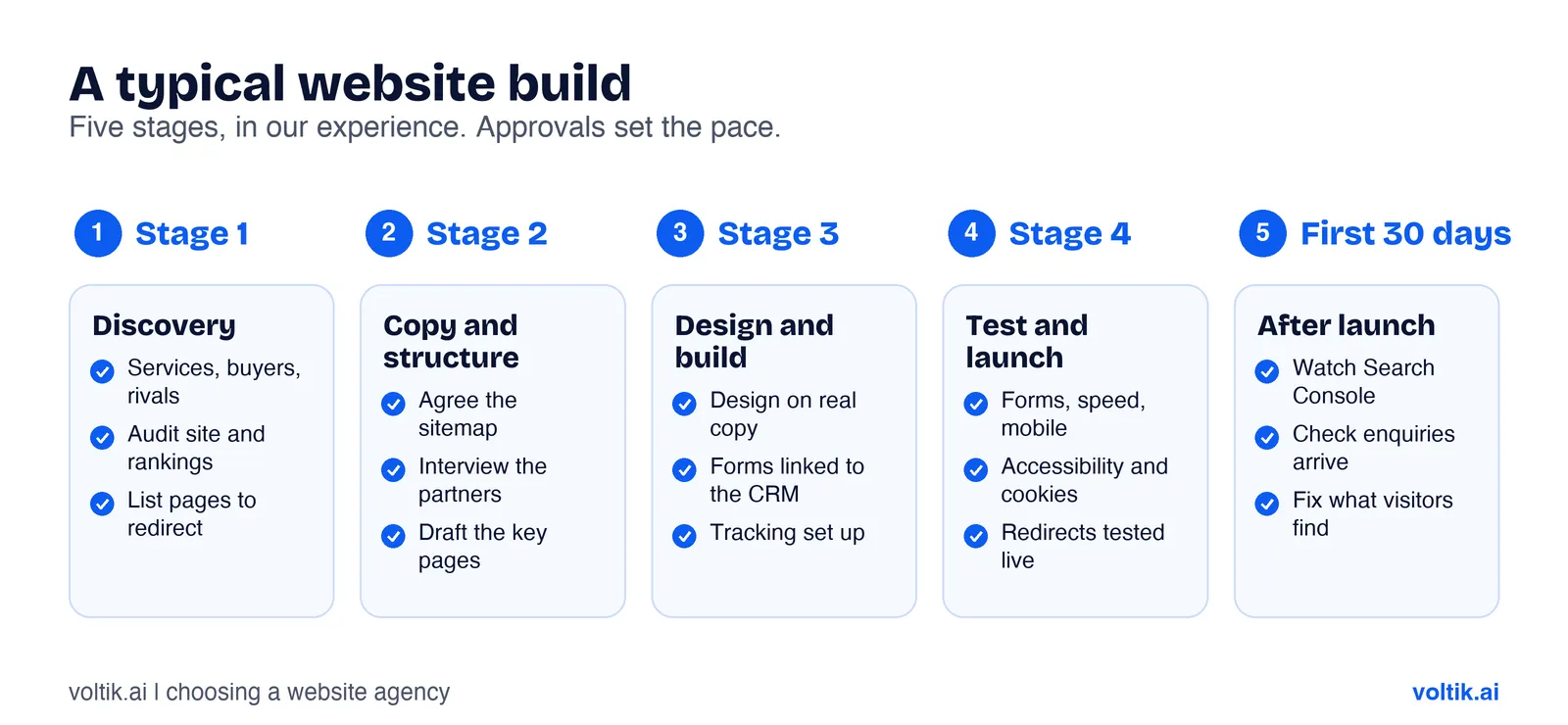 A typical build in our experience. Your timeline will depend on size and approvals.
In our experience, a typical build follows five stages.
1. Discovery. The agency learns your services, buyers and competitors. It audits your current site, rankings and enquiry path, and lists every page that must be redirected.
2. Copy and structure. The sitemap is agreed. The agency interviews your partners and drafts the key pages. Words come before design, so the design fits what you need to say.
3. Design and build. The design is shown on real pages with real copy. The site is built, forms are connected to the CRM, and tracking is set up.
4. Testing and launch. Forms, redirects, speed, mobile, accessibility and cookie consent are all checked. The site goes live, and redirects are tested again on the live domain.
5. The first 30 days. The agency watches Search Console for errors, checks that enquiries arrive, and fixes what real visitors find.
Approvals are the most common cause of delay we see. Agree who signs off and by when before you start.
How do you judge an agency’s portfolio?
A portfolio should prove an agency can do the job you need. Use these checks:
- Open the live sites. Screenshots can be from mock-ups. Visit the real site on your phone.
- Look for firms like yours. A great restaurant site tells you little about building a site for a law firm.
- Test the enquiry path. Find the contact form. Is it easy to find and short to fill in?
- Check the speed. Run the live site through Google’s PageSpeed Insights and look at the Core Web Vitals.
- Ask what changed. Ask what happened to enquiries or rankings after launch, and whether you can speak to the client.
Common mistake: choosing on the homepage alone. Click through to a service page and the contact page. That is where the work is won or lost.
Are there extra rules for law firms and other regulated firms?
Yes. A good agency asks about your rules early and builds them in.
Solicitors in England and Wales. At the time of writing (November 2026), the SRA Transparency Rules say firms must show their SRA number and the SRA digital badge in a prominent place on their website. The SRA says the badge, also called the clickable logo, has been mandatory since 25 November 2019. It only works once the firm’s website is linked in mySRA. The SRA says firms must also publish their complaints procedure, including how and when to complain to the Legal Ombudsman and the SRA.
Price information. The SRA says the same rules require cost information, in a prominent place on the website, for certain services. These include residential conveyancing, uncontested estate administration, some immigration work, defending employer unfair or wrongful dismissal claims, and debt recovery up to £100,000. Check the full list on the SRA’s page.
Other regulated firms. Accountants, financial advisers and others have their own rules. Give the agency your compliance list at the start.
Cookies. The ICO’s guidance says UK firms need consent for cookies and trackers unless an exception applies, and that the statistics exception never covers advertising. Ask how the agency’s cookie banner blocks ad trackers until a visitor says yes.
The scoring checklist
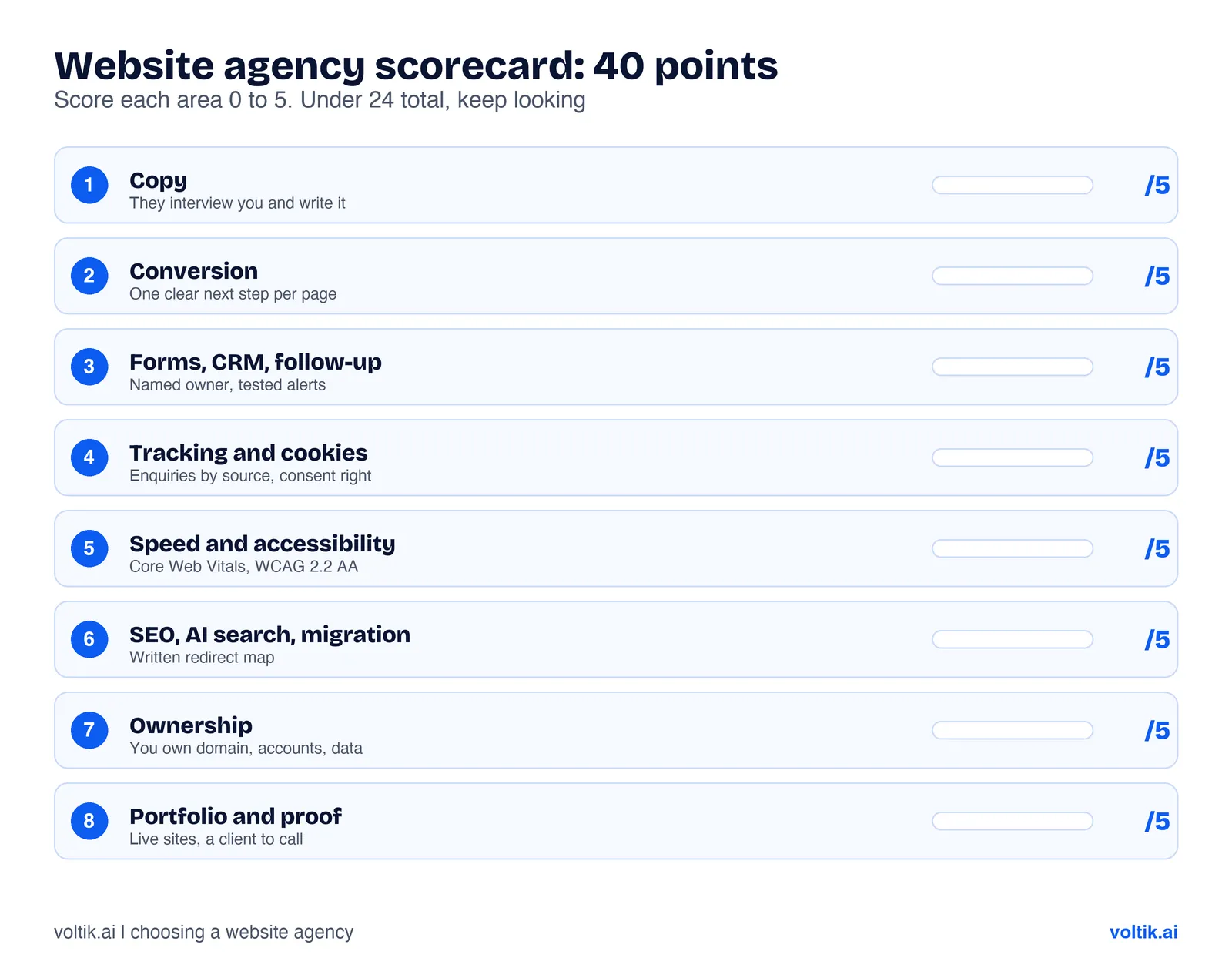 Score each agency out of 40. Compare the totals, then talk about the gaps.
Copy this into a spreadsheet. Score each area from 0 to 5 for each agency on your shortlist.
| Area | What a 5 looks like | Score (0 to 5) |
|---|---|---|
| Copy | They interview you and write the pages | |
| Conversion | A clear next step on every page, with a reason | |
| Forms, CRM and follow-up | Enquiries reach a named person and a CRM, tested | |
| Tracking and cookies | Enquiries tracked by source, consent set up properly | |
| Speed and accessibility | Core Web Vitals shown on live work, WCAG 2.2 AA as standard | |
| SEO, AI search and migration | A written redirect map and a plan for after launch | |
| Ownership | You own the domain, hosting, code and accounts in writing | |
| Portfolio and proof | Live sites for firms like yours, with a client you can call |
How to read it. 32 or more out of 40 is a strong shortlist candidate. Between 24 and 31, ask about the weak areas before you decide. Under 24, keep looking. These cut-offs are our suggestion, so adjust them to what matters most to you. A zero on ownership or migration should rule an agency out on its own.
Where Voltik fits, and when we are the wrong choice
We are a London growth agency. We build websites that turn visitors into enquiries, plus the tech behind them: forms, CRM and follow-up in Nova, tracking, speed and search. We also run LinkedIn branding, SEO and AI search, and Meta and Google ads, so we plan the site around how enquiries will reach you.
We are likely a good fit if you are a professional services or B2B firm that wants the website to bring in work. You value plain, clear copy. You want clear, written rules on what you own and what you can take with you. And you can give us time with the people who know your clients best.
We are likely the wrong choice if you want a design-only refresh with no change to copy or follow-up. We are also wrong if you need a large online shop, a complex web app, or an in-house team on site every day. And if you want a guaranteed number of enquiries or a guaranteed ranking, no honest agency can promise that, and we will not either.
If we are the wrong fit, we will say so on the first call.
Questions people ask
How do I choose a web design agency for a professional services firm?
Judge copy, conversion, forms and CRM, tracking, speed, SEO and migration as well as design. Check you will own the domain, hosting, code and accounts. Then score each agency and compare.
What should I ask a web design agency before hiring?
Ask who writes the copy, how they protect your rankings at launch, what happens when someone fills in a form, who owns the domain and code, how they measure success, and what the price includes after launch.
Will I lose my Google rankings if I rebuild my website?
You can keep most of them if the move is done well. Google’s guidance says to map old URLs to new ones, use permanent redirects and keep them for at least a year. It also says to expect rankings to fluctuate for a while during a move.
What must a solicitors’ website show in England and Wales?
The SRA’s Transparency Rules say it must show the firm’s SRA number and digital badge in a prominent place, its complaints procedure, and price information for certain listed services. Check the SRA’s page for the full rules.
Do I need a special website for AI search?
Google says there are no extra requirements to appear in AI Overviews or AI Mode, and the usual SEO basics still apply. A clear, well-structured, crawlable site with useful content is the starting point.
Sources
- Solicitors Regulation Authority, “SRA Transparency Rules”, SRA website, accessed November 2026.
- Solicitors Regulation Authority, “Clickable logo”, SRA website, accessed November 2026.
- Google, “Site moves with URL changes”, Google Search Central documentation, accessed November 2026.
- Google, “AI features and your website”, Google Search Central documentation, accessed November 2026.
- Google, “Understanding Core Web Vitals and Google search results”, Google Search Central documentation, accessed November 2026.
- GOV.UK, “Understanding accessibility requirements for public sector bodies”, GOV.UK guidance, accessed November 2026.
- Information Commissioner’s Office, “Cookies and similar technologies”, Guide to PECR, accessed November 2026.
- Information Commissioner’s Office, “Guidance on the use of storage and access technologies: What are the exceptions?”, ICO website (last updated 29 April 2026), accessed November 2026.
Want a website that wins enquiries?
We plan, write and build websites for professional services firms, with the forms, CRM, tracking and search set up behind them, and you own all of it. If you would like us to look at your current site and tell you honestly what to fix, book a free call.
Work with us