

Why Your Business Should Send Email From More Than One Domain: Notifications, Follow-Up and Cold Email Explained
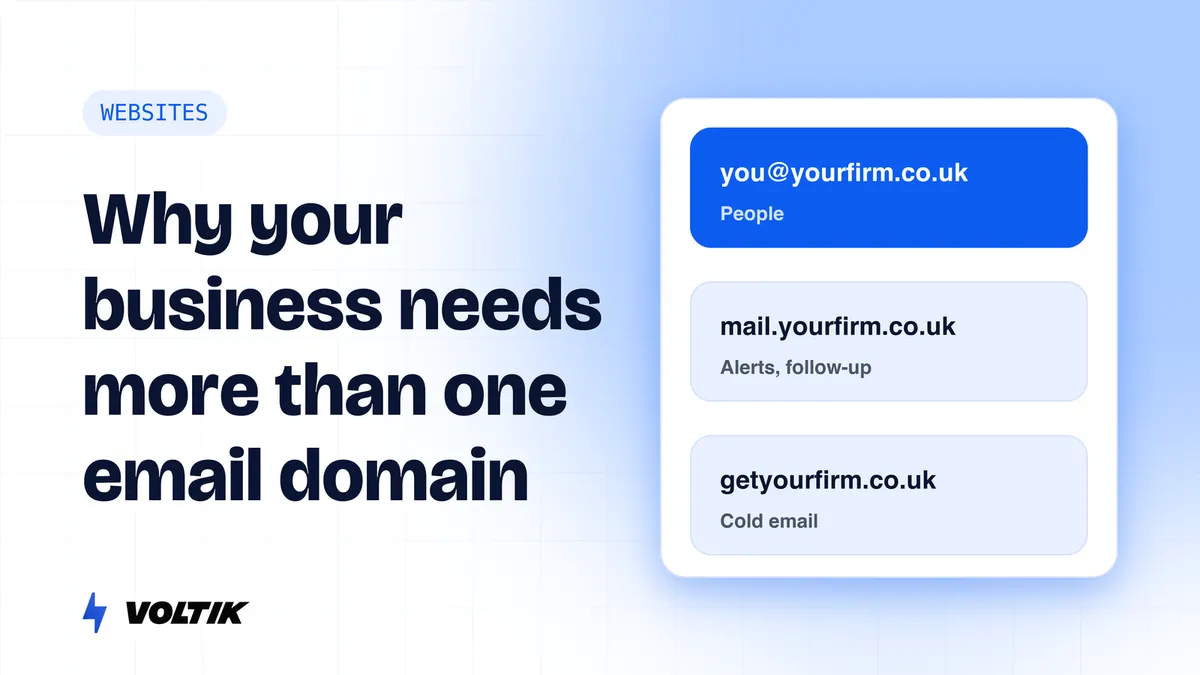
Should your lead alerts, follow-up emails and cold emails all come from the same address? No. Every domain that sends email has a reputation with Gmail and Outlook, and one risky kind of email can drag your everyday client email into spam. This guide explains which email should come from which address, how to set up a sending subdomain, how to warm up a new domain, and how to keep follow-up and cold email out of spam.
Quick answer
Send different kinds of email from different names, so a problem with one cannot hurt the others. Keep your main domain (you@yourfirm.co.uk) for real people writing to real people. Send automated email, such as lead alerts, booking confirmations, reminders and follow-ups, from a subdomain such as mail.yourfirm.co.uk. Send cold email only from separate look-alike domains such as getyourfirm.co.uk, never from your main domain or a subdomain of it. Set up SPF, DKIM and DMARC on every one. Warm up any new domain for about three weeks before it sends cold email. Internal alerts that only reach you can come from your platform’s shared domain or your own subdomain, as long as they arrive.
What kinds of email does a business send?
Most firms send five kinds of email without thinking of them as different. Each one carries a different risk.
| Kind of email | Who gets it | Example | Risk of spam complaints |
|---|---|---|---|
| People to people | Clients, partners, suppliers | “Here is the proposal we discussed” | Very low |
| Internal alerts | You and your team | “New enquiry from the contact form” | None (you are the reader) |
| Automated to contacts | Leads and clients | Form confirmation, booking reminder, follow-up | Low, if it is wanted |
| Marketing | Your list | Newsletter, event invite | Medium |
| Cold email | Strangers | A first message to a prospect | Highest |
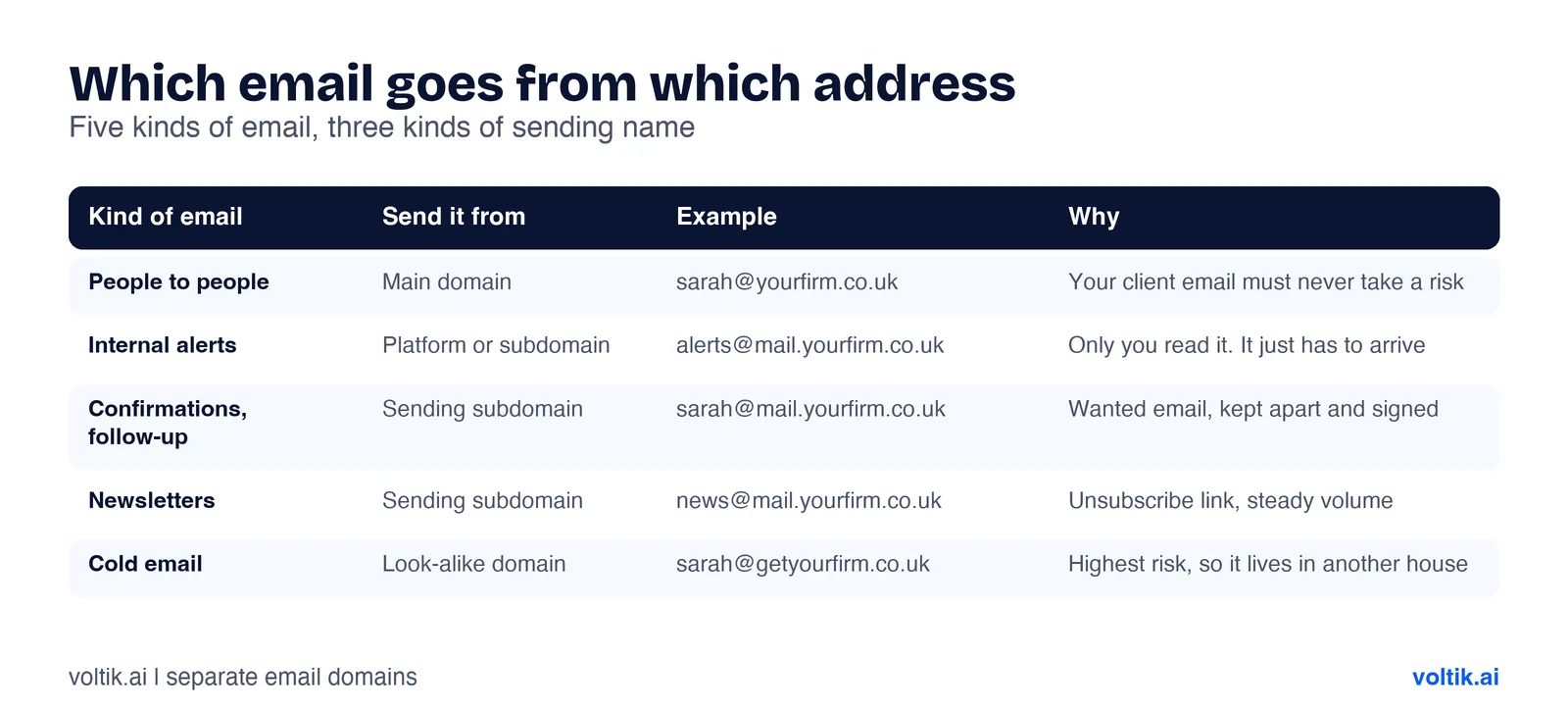 Five kinds of email, three kinds of sending name.
If all five come from you@yourfirm.co.uk, the riskiest one sets the reputation for all of them.
Why use different email domains? The plain-English version
Think of every domain that sends email as having a credit score with the inbox providers: Gmail, Outlook, Yahoo and the rest. Each time someone opens, replies to or saves your email, the score goes up. Each time someone marks it as spam, or it bounces because the address does not exist, the score goes down. When the score is low, your email goes to the spam folder, including the important emails.
Now picture a firm that sends everything from one domain. A cold email campaign goes out to 500 strangers. Twenty of them click “Report spam”. The domain’s score drops. The next morning, the partner sends a proposal to a real client from the same domain, and it lands in that client’s junk folder. Nobody knows why the client went quiet.
Splitting your email works like keeping separate bank accounts. If one account has a problem, the others are fine.
- Your main domain is your personal account. Only people writing to people. It should never take a risk.
- A subdomain (mail.yourfirm.co.uk) is a separate room in the same house. It has its own name and its own settings, and inbox providers can see it is a different kind of mail. It is still part of your house.
- A look-alike domain (getyourfirm.co.uk) is a different house. If it gets a bad name, your main domain is not touched.
What do Gmail, Yahoo and Microsoft actually say?
We read the sender rules from all three. This is what they say, and what they leave out.
Google (Gmail). Since February 2024, every sender to Gmail must use SPF or DKIM and keep its spam rate, as shown in Google’s Postmaster Tools, below 0.3%. Google advises staying below 0.1%. Senders of close to 5,000 messages or more a day to personal Gmail accounts count as bulk senders. They must use SPF, DKIM and DMARC, and add one-click unsubscribe to marketing email. Three details matter here:
- Google says it tracks “volume, feedback, and limits per domain and IP address”. Your domain’s history follows it.
- Google says messages of the same type should come from the same From address, and different types of content should not be mixed in one message.
- Subdomains count towards your main domain. Google’s own example: 2,500 emails from a main domain plus 2,500 from a promotions subdomain makes the sender a bulk sender, because both come from the same main domain. Once a sender is a bulk sender, that status is permanent.
Yahoo. Yahoo’s sender guide has a heading that says to separate email types by IP address or DKIM domain. It says not to send marketing email from the same IP addresses you use for personal, transactional or alert email. It also asks senders to keep the spam rate below 0.3%.
Microsoft (Outlook.com). From May 2025, senders of more than 5,000 messages a day to Outlook.com, Hotmail and Live addresses must use SPF, DKIM and DMARC.
What none of them say. We found no page from Google saying whether a subdomain’s reputation is kept fully apart from its main domain. So we work on the safe side. We use subdomains to keep wanted, automated email tidy and easy to recognise. We never use them for cold email.
Domain, subdomain or look-alike domain: which one for what?
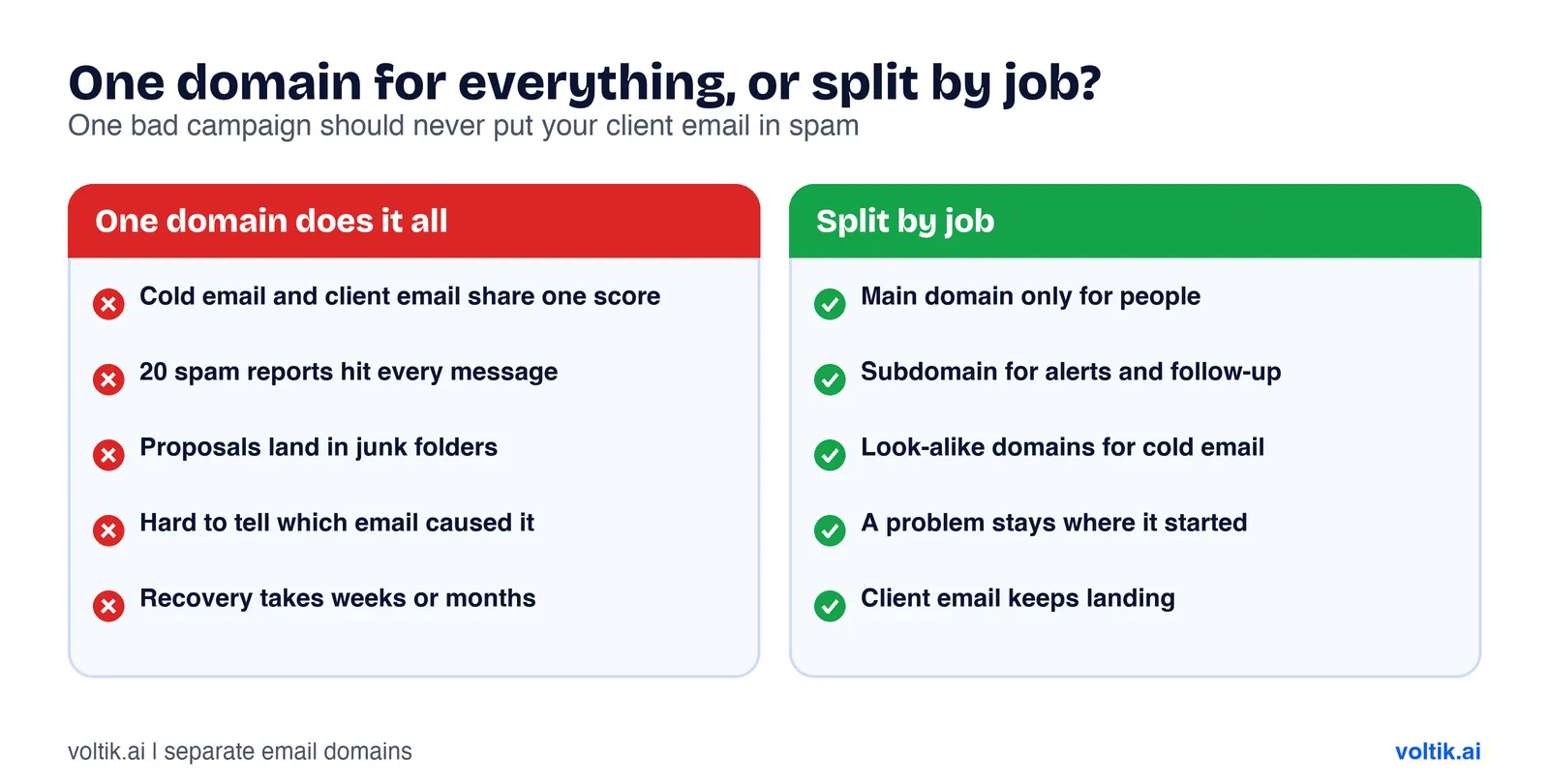 One bad campaign should never put your client email in spam.
| Sending name | Example | Use it for | Never use it for |
|---|---|---|---|
| Main domain | sarah@yourfirm.co.uk | Real conversations with clients, partners and staff | Bulk email, automated email in large numbers, cold email |
| Sending subdomain | hello@mail.yourfirm.co.uk | Lead alerts, form confirmations, booking reminders, follow-up to people who asked, newsletters | Cold email |
| Look-alike domain | sarah@getyourfirm.co.uk | Cold email to new prospects, with real names and a working opt-out | Anything clients rely on |
Some firms add a second subdomain, such as news.yourfirm.co.uk, to keep newsletters apart from booking reminders. That helps once your list is large. Most small firms do not need it on day one.
How do you set up a sending subdomain?
You do this once, and it takes about an hour plus waiting time. These are the steps we give clients. Your email platform may label things slightly differently.
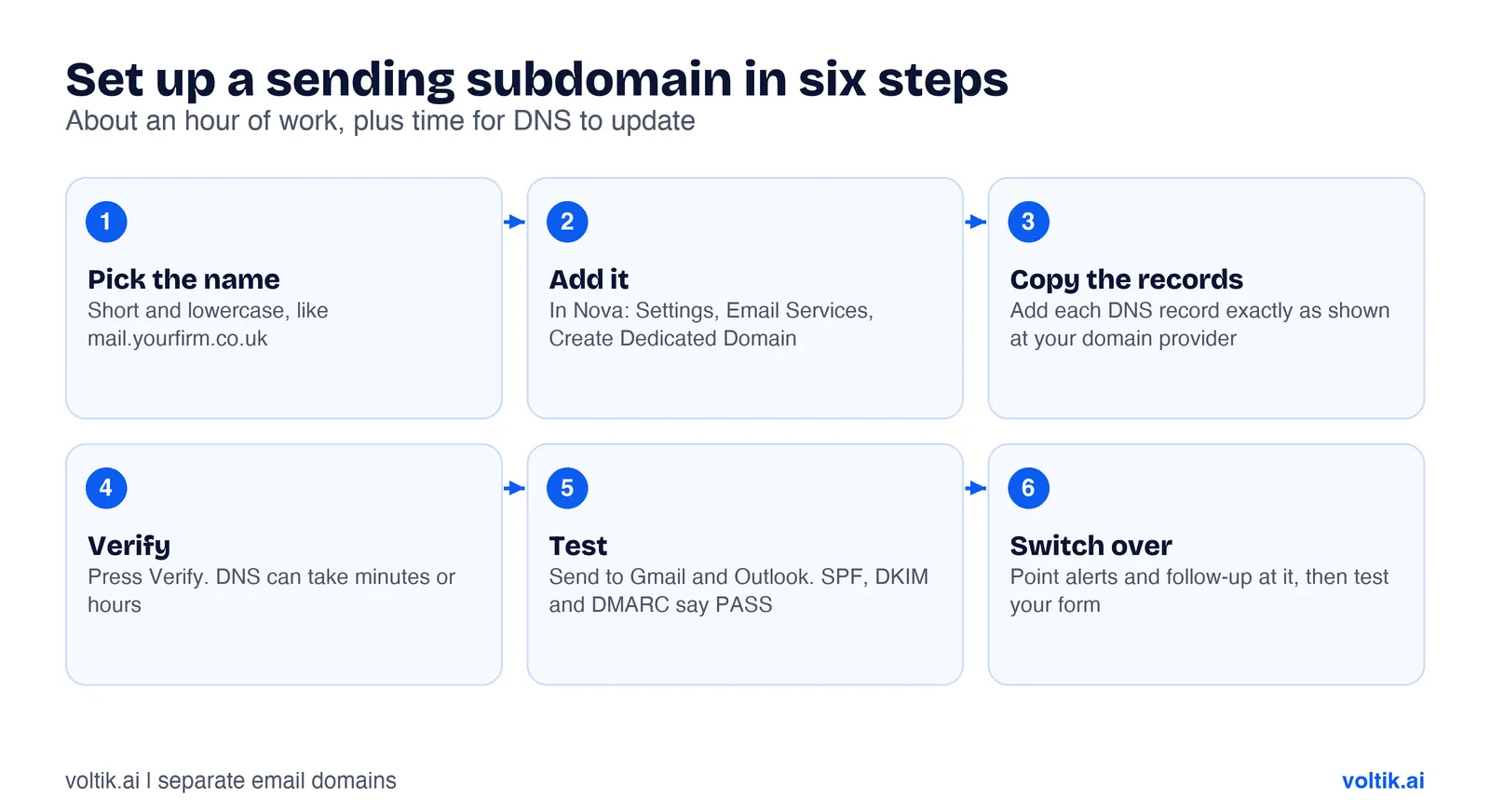 Six steps, done once.
- Pick the name. Use lowercase and keep it short: mail.yourfirm.co.uk or send.yourfirm.co.uk. Leave your main domain for people.
- Add it in your email platform. In Nova, go to Settings, then Email Services, and click “Create Dedicated Domain”. Enter the subdomain and click “Add & Verify”. Nova shows a list of DNS records. Keep that page open.
- Copy the records to your domain provider, wherever your DNS is managed (often the company you bought the domain from, or Cloudflare). Add each record exactly as shown: the type, the name and the value. You will usually see MX and TXT records, and often a CNAME. One typo will stop it working.
- Go back and press Verify. DNS changes can take a few minutes or a few hours. If it fails, wait and try again before changing anything.
- Send a test to a Gmail address and an Outlook address of your own. In Gmail, open the message, click the three dots and choose “Show original”. You want SPF, DKIM and DMARC all to say PASS.
- Switch your emails over. Point your alerts, confirmations and follow-ups at the new sending address, then send one real test enquiry through your website form from start to finish.
What the three records do, in plain English:
- SPF is a guest list. It names the services allowed to send email for your domain.
- DKIM is a wax seal. It adds a hidden signature that proves the email really came from you and was not changed on the way.
- DMARC is the instructions for the doorman. It tells inbox providers what to do with email that fails the first two checks: report it, put it in spam or block it. It also sends you reports, so you can see who is sending as your domain.
One detail people miss. If your main domain has a DMARC record, your subdomain follows it unless you say otherwise. The DMARC standard has a setting called sp for subdomains. If sp is missing, the main policy applies to every subdomain. So if your main domain is set to reject failing email, a half-set-up subdomain will have its email rejected. Finish the setup and check for PASS before you switch anything over.
How should notifications be set up?
Here is how we set up new-lead alerts.
- The alert goes to a named person, and to a backup if the first person is away. A shared inbox where everyone assumes someone else has it is how leads go cold.
- It can come from your platform’s shared domain or your own subdomain. It makes no difference, as long as it arrives. You are the only reader, so spam complaints are not a risk. Add the sending address to your contacts and make a filter that never sends it to spam.
- Put the useful facts in the subject line: “New enquiry: [name], [service], [source]”. You should know who it is from your lock screen.
- Add a second alert, such as a text message or a phone notification, so an email filter can never hide a lead.
- Test it every month. Submit your own form and time how long the alert takes.
The email that goes to the lead deserves more care than the alert that goes to you. The confirmation, “Thanks, here is what happens next”, goes to someone who has never heard from your system before. It should come from your authenticated subdomain, with a real person’s name on it.
How do you keep follow-up emails out of spam?
Follow-up emails go to people who asked to hear from you, so they start with an advantage. Most spam problems come from small habits:
- Send from your authenticated subdomain, with SPF, DKIM and DMARC passing.
- Use a real name and a reply address someone reads. “noreply@” tells people, and inbox providers, that you do not want a conversation.
- Write like a person. Short, plain text, one link at most, and no images of text. A follow-up that looks like a newsletter gets treated like one.
- Stop the moment they reply or book. Nothing earns a spam click faster than an automated chase after someone has already answered.
- Make it easy to opt out. One line at the bottom: “Reply ‘stop’ and I will not follow up again.” For marketing email, add a proper unsubscribe link.
- Keep it to three follow-ups over about 10 days, then stop. Our speed to lead guide has the full sequence and the stop rules.
- Clean your list. Remove addresses that bounce. Bounces count against you too.
How do you warm up a new email domain?
A brand-new domain that sends hundreds of emails on its first day looks exactly like a spammer. Warming up means building a history slowly, so inbox providers learn that people want your email.
For a sending subdomain that only sends alerts, confirmations and follow-ups to people who asked, you rarely need a warm-up tool. That email is wanted, opened and replied to, and the volume is low. Start with your normal flow and watch for problems in the first two weeks.
For a newsletter list on a new subdomain, send to your most engaged contacts first, then add the rest in batches over two or three weeks.
For a cold email domain, warm-up is essential. The working plan we use, per mailbox:
| Week | Warm-up emails a day | Cold emails a day | What to do |
|---|---|---|---|
| 1 | 5 to 10 | 0 | Set up SPF, DKIM and DMARC. Turn on a warm-up tool. Send a few real emails to colleagues |
| 2 | 15 to 20 | 0 | Keep warming. Check Google Postmaster Tools and test where your email lands |
| 3 | 20 | 10 to 15 | Start cold email to your less important prospects |
| 4 on | 20 | 25 to 35 | Add your best prospects. Keep a hard cap of about 40 a day per mailbox |
These are rules of thumb from running campaigns. Google publishes no warm-up numbers. A warm-up tool sends email between a network of real inboxes that open it, reply to it and move it out of spam. Keep warm-up running even after cold sending starts. Pause straight away if bounces go over 2%, complaints come close to 0.1%, or your tests show email landing in spam.
What do we do for cold outbound?
Cold email is the riskiest email you send, so it gets its own setup, completely apart from your real domain.
- Two or three look-alike domains, such as getyourfirm.co.uk or yourfirmhq.co.uk. Each one redirects to your real website, so anyone who checks finds the real firm.
- Two mailboxes per domain, under real people’s names, with a real signature: name, role, firm and how to opt out.
- SPF, DKIM and DMARC on every domain, then about three weeks of warm-up before the first cold email.
- A hard cap per mailbox of about 35 to 40 cold emails a day. To send more, add mailboxes. Never push one mailbox harder.
- Small, verified lists. We check every address before sending, and we pick prospects for a reason, such as hiring, funding or a new leader.
- Short emails written for one person, three or four sentences, with one real line of research.
- Replies move to the main domain. When a prospect replies with interest, the conversation can move to your real address. That is where the relationship lives.
At the time of writing (November 2026), the ICO’s guidance says that under PECR you can email marketing to limited companies and LLPs without their prior consent, as long as you say who you are and give a working way to opt out. The ICO says stricter rules apply to sole traders and some partnerships, and that UK GDPR still applies to the named person you email. We are not lawyers and this is not legal advice. Rules and guidance change, so check the ICO’s current guidance or speak to a solicitor before you act. Our B2B cold email playbook covers the whole system: the offer, the list, the DNS records, the templates and the cadence.
Common mistakes we see
- Cold email from the main domain. The most expensive mistake on this list. One bad week can put client email in spam, and it can take weeks to recover.
- Cold email from a subdomain. Better than the main domain, but Google counts subdomain mail towards the main domain, and we will not bet your client email on the rest being kept apart.
- Two SPF records on one domain. You may only have one. Two make SPF fail. Merge them into one record.
- Switching on DMARC “reject” before checking every sender. Your invoicing tool, your booking tool and your CRM may all send as your domain. Start DMARC on
p=none, read the reports for two to four weeks, then tighten it. - noreply@ addresses. People reply to confirmations with real questions. Those replies should reach someone.
- Never testing. A form that worked at launch can stop sending alerts after a password change or a platform update. Test monthly.
Questions people ask
Why should my business use different email domains?
Every sending domain builds its own reputation with inbox providers. If you keep risky email, such as cold email, on separate domains, a spam problem there cannot push your everyday client email into junk folders.
What is a sending subdomain?
It is a name under your main domain, such as mail.yourfirm.co.uk, used only for automated email like alerts, confirmations, reminders and follow-ups. It has its own SPF, DKIM and DMARC settings, and it keeps that email apart from your personal mailboxes.
Does a subdomain protect my main domain’s reputation?
Partly. It separates the mail streams and makes them easier for inbox providers to tell apart. Google still counts subdomain email towards the main domain when it decides whether you are a bulk sender, and it does not say that subdomain reputation is fully separate. For cold email, use a separate domain.
Should my new-lead notifications come from my own domain?
It makes little difference for alerts that only you receive, as long as they arrive. Add the sender to your contacts and set a filter so they never go to spam. Emails that go to the lead, such as confirmations and follow-ups, should come from your own authenticated subdomain.
How long does it take to warm up an email domain?
For cold email, plan on about three weeks: start at 5 to 10 emails a day per mailbox and build to about 20 before any cold email goes out. A subdomain sending only wanted, low-volume email such as booking confirmations rarely needs a warm-up tool.
What are SPF, DKIM and DMARC?
They are three DNS records that prove your email is really from you. SPF lists who may send for your domain, DKIM signs each email, and DMARC tells inbox providers what to do with email that fails and sends you reports. Google requires all three from senders of about 5,000 or more emails a day to Gmail, and we set up all three for every client.
Sources
- Google, “Email sender guidelines”, Gmail Help, accessed November 2026.
- Google, “Email sender guidelines FAQ”, Gmail Help, accessed November 2026 (definition of bulk sender; subdomain mail counted under the same primary domain; bulk status permanent).
- Yahoo, “Sender Best Practices”, Yahoo Sender Hub, accessed November 2026.
- Microsoft, “Strengthening Email Ecosystem: Outlook’s New Requirements for High-Volume Senders”, Microsoft Defender for Office 365 blog, 2025, accessed November 2026.
- Kucherawy, M. and Zwicky, E. (editors), “Domain-based Message Authentication, Reporting, and Conformance (DMARC)”, RFC 7489, Internet Engineering Task Force, March 2015 (the
spsubdomain policy tag). - Information Commissioner’s Office, “Business-to-business marketing”, Direct marketing and PECR guidance, accessed November 2026.
Want us to set this up for you?
We set up sending domains, alerts, follow-up and CRM connections as part of our website work, so every enquiry reaches a person and every reply reaches the lead. If you want us to check where your emails are landing today, book a free call. For the wider system, read our lead generation playbook for professional services.
Work with us